






Diagnose Your Elliott from the Ground: A Field Guide to IQANgo Remote Diagnostics
When equipment isn’t working as expected, getting the right information quickly can make all the difference. With the right diagnostic tools, troubleshooting can begin right there in the field — before a technician ever arrives on site.
That’s where IQANgo remote diagnostics can help.
Available on many newer Elliott machines equipped with Bluetooth Remote Diagnostics, IQANgo gives operators and technicians access to valuable machine information from a phone or tablet. From checking fault codes and monitoring live values to connecting with a technician for remote assistance, the app can help streamline troubleshooting and reduce equipment downtime.
What Is IQANgo?
IQANgo is a free machine diagnostics app from Parker that connects to the Parker IQAN control system used on some Elliott equipment. On machines equipped with Bluetooth Remote Diagnostics, users can connect a compatible phone or tablet to access diagnostic information directly from the machine.
Instead of waiting until a service technician is physically connected to the equipment, IQANgo provides access to machine information that supports real-time troubleshooting and can help identify potential issues in the field. When additional support is needed, remote assistance allows an Elliott or dealer technician to connect to the system and help troubleshoot.
What Can You Do with IQANgo?
IQANgo provides several tools that can make troubleshooting and equipment support more efficient.
- View the system overview. Check the status of the machine’s system, including modules and inputs or outputs displaying an alarm or error. This can help narrow down where an issue is occurring.
- Review logs. Access system, event and statistical logs and filter entries to find information relevant to the issue you’re troubleshooting.
- Measure live values. View values for specific inputs, outputs or internal channels, including units and status information. Values can also be displayed as a line graph, which can be particularly useful when troubleshooting intermittent issues.
- Make adjustments. Depending on the system and user access, IQANgo can be used to adjust certain inputs, outputs and parameters or return a setting to its default value.
- Connect for remote assistance. IQANgo can use your mobile device’s internet connection to provide remote access to the machine’s IQAN system. An Elliott or dealer technician can then assist with troubleshooting and, when appropriate, software updates or calibration.
5 Things IQANgo Lets You Do
System Overview
Logs

Measure

Adjust
Remote Assistance
How Can Bluetooth Remote Diagnostics Help Reduce Downtime?
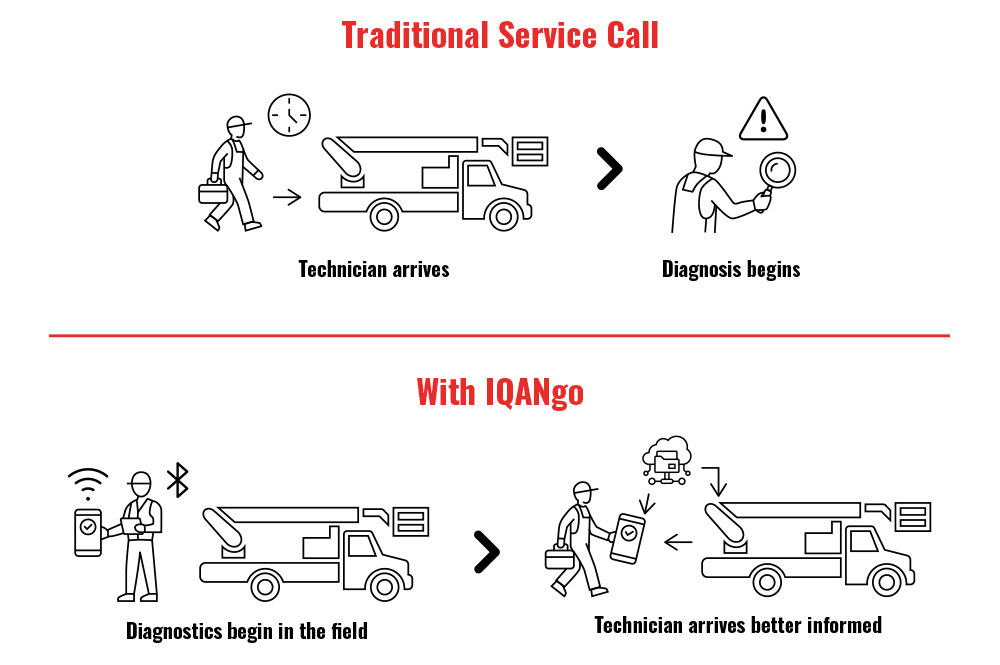
Traditional troubleshooting can require a technician to travel to the machine before the diagnostic process even begins. Bluetooth Remote Diagnostics can provide useful information sooner.
By accessing fault codes, logs and live system values through IQANgo, operators and service teams can begin identifying an issue while the equipment is still in the field. If additional service is required, that information can help the technician better understand the problem before arriving.
The result can be a more informed service call, less time spent diagnosing the issue on site and fewer unnecessary trips — all of which can help get equipment back to work sooner.
How to Connect to Your Elliott with IQANgo
Elliott’s Tech Tip, How to Use and Connect IQANgo, provides a complete walkthrough. In general, connecting involves these steps:
- Download the free IQANgo app from the App Store or Google Play.
- Make sure Bluetooth is enabled on your phone or tablet and the machine is parked, stable and in a safe state.
- Open IQANgo and pair your device with the machine’s Bluetooth adapter.
- Open the system overview to review system status and active alarms.
- If additional troubleshooting is needed, initiate a remote-assistance session so a technician can connect to the system.
Safety Reminder
Before using IQANgo for remote diagnostics, adjustments or software updates, make sure the equipment is parked, stable and in a safe state clear of people. Always follow established operating and safety procedures.
Which Elliott Machines Offer Bluetooth Remote Diagnostics?
Bluetooth Remote Diagnostics is available on many newer Elliott machines, including the L50 HiReach, L65 HiReach, BoomTruck cranes and select E-Line aerial models and select Digger Derrick models.
Availability can vary by model and configuration, so check with your Elliott dealer or Elliott Equipment directly to confirm whether a specific machine supports IQANgo remote diagnostics.
More Information. Less Guesswork.
When equipment goes down, troubleshooting shouldn’t have to start with a service technician arriving on site.
IQANgo gives operators and service teams access to machine information that can help them understand what’s happening sooner. With fault codes, logs, live values and remote technician assistance available from a mobile device, crews have another tool to help simplify troubleshooting and reduce downtime.
Put IQANgo Remote Diagnostics to Work
See Elliott’s How to Use and Connect IQANgo Tech Tip for step-by-step connection instructions, or contact Elliott Technical Support for help using Bluetooth Remote Diagnostics on your machine.
Frequently Asked Questions
What is IQANgo?
IQANgo is a free service and machine diagnostics app from Parker for iOS and Android devices. It connects wirelessly to the Parker IQAN control system on compatible Elliott machines, allowing users to check system status, view logs, measure live values, make certain adjustments and enable remote assistance.
How do I connect to my Elliott with IQANgo?
Download IQANgo, enable Bluetooth on your mobile device and make sure the machine is parked, stable and in a safe state. Open the app, pair your device with the machine’s Bluetooth adapter and access the system overview. Elliott’s How to Use and Connect IQANgo Tech Tip provides step-by-step instructions.
Does Elliott have remote diagnostics?
Yes. Bluetooth Remote Diagnostics using IQANgo is available on many newer Elliott machines, including the L65 HiReach, BoomTruck cranes and select E-Line models. Availability varies by model and configuration.
How does Bluetooth Remote Diagnostics reduce downtime?
Bluetooth Remote Diagnostics can help operators and technicians identify faults and access diagnostic information before a technician travels to the machine. That information can help streamline troubleshooting, make service calls more informed and reduce unnecessary trips and diagnostic time.